Avoid using `searchParams`
6/22/2025
Introduction
One of the mistake I made in my recent NextJS project is carelessly using searchParams to pass data. While there are circumstances where passing data via searchParams is absolutely necessary or more convenient, choosing this option over available alternatives could cause performance disadvantages:
- NextJS opt-out static rendering for dynamic rendering because the value of
searchParamscan't be known on the build time. - If the value of
searchParamsdepends on the user input, we need to wait for user input before prefetching the page.
Setting up the example app
In this post, we're going to demonstrate how to refactor pages using searchParams by building an example imlementation of registration flow which consists of two screens:
- Sign Up -> where user fills the registration form
- Email verification -> contains a single OTP input and a text "verification code has been sent to <user-email>"
Sign up page
// /sign-up/page.tsx
import React from 'react';
import { SignUpForm } from './form';

export default async function SignUpPage() {
  return (
    <div>
      <div>
        <h2>
          Create an account
        </h2>
        <SignUpForm />
      </div>
    </div>
  );
}
Sign up form
// /sign-up/form.tsx
'use client';
import React, { useState } from 'react';
import { useRouter } from 'next/navigation';

export function SignUpForm() {
 const [form, setForm] = useState({ email: '', username: '', password: '' });

 const handleChange = (e: React.ChangeEvent<HTMLInputElement>) => {
  setForm({ ...form, [e.target.name]: e.target.value });
 };

 const router = useRouter();

 const handleSubmit = (e: React.FormEvent) => {
  e.preventDefault();
  console.log('Sign Up Data:', form);
  router.push(`/email-verification?email=${encodeURIComponent(form.email)}`);
 };

 return (
  <div >
   <div >
    <h2 >Create an account</h2>
    <form className="space-y-6" onSubmit={handleSubmit}>
     <div className="space-y-4">
      <div>
       <label htmlFor="email" >
        Email address
       </label>
       <input
        id="email"
        name="email"
        type="email"
        required
        value={form.email}
        onChange={handleChange}
       />
      </div>
      <div>
       <label htmlFor="username" >
        Username
       </label>
       <input
        id="username"
        name="username"
        type="text"
        required
        value={form.username}
        onChange={handleChange}
       />
      </div>
      <div>
       <label htmlFor="password" >
        Password
       </label>
       <input
        id="password"
        name="password"
        type="password"
        required
        value={form.password}
        onChange={handleChange}
       />
      </div>
     </div>

     <div>
      <button
       type="submit"
      >
       Sign Up
      </button>
     </div>
    </form>
   </div>
  </div>
 );
}
Email verification page
// /email-verification/page.tsx
import { EmailVerificationForm } from './form';

export default async function EmailVerificationPage({
  searchParams,
}: {
  searchParams: Promise<{ email: string }>;
}) {
  const email = decodeURIComponent((await searchParams).email);

  return (
    <div className="flex min-h-screen items-center justify-center bg-gray-50 px-4">
      <div className="w-full max-w-md space-y-6 rounded-2xl bg-white p-8 text-center shadow-xl">
        <h2 className="text-2xl font-bold text-gray-900">Verify Your Email</h2>
        <EmailVerificationForm email={email} />
      </div>
    </div>
  );
}
Email verification form
// /email-verification/form.tsx
'use client';
import { useState } from 'react';

export function EmailVerificationForm({ email }: { email: string }) {
  const [otp, setOtp] = useState(Array(6).fill(''));

  const handleChange = (index: number, value: string) => {
    if (/^[0-9]?$/.test(value)) {
      const updated = [...otp];
      updated[index] = value;
      setOtp(updated);

      // auto focus next input
      const next = document.getElementById(`otp-${index + 1}`);
      if (value && next) (next as HTMLInputElement).focus();
    }
  };

  const handleSubmit = () => {
    const code = otp.join('');
    console.log('Submitted OTP:', code);
  };

  return (
    <>
      <p>
        A verification code has been sent to{' '}
        <span className="font-semibold text-gray-900">{email}</span>.
      </p>
      <div>
        {otp.map((digit, idx) => (
          <input
            key={idx}
            id={`otp-${idx}`}
            type="text"
            inputMode="numeric"
            maxLength={1}
            value={digit}
            onChange={(e) => handleChange(idx, e.target.value)}
          />
        ))}
      </div>
      <button onClick={handleSubmit}>
        Verify
      </button>
    </>
  );
}
Measuring performance
After we submitted the sign-up form, you may notice a slight delay because the /email-verification page is renderred on-demand.
It doesn't make much sense that /email-verification is renderred on demand, because almost the entire page will look the same for every user, it's only the message "A verification code has been sent to {...}" that's personalised for the user. In addition, the (Next) server doesn't really need to know this value.
Build result
Route (app)                                 Size  First Load JS
┌ ○ /                                    5.76 kB         107 kB
├ ○ /_not-found                            977 B         102 kB
├ ƒ /email-verification                    702 B         102 kB
└ ○ /sign-up                               744 B         102 kB
+ First Load JS shared by all             101 kB
  ├ chunks/4bd1b696-18452535c1c4862d.js  53.2 kB
  ├ chunks/684-37abc27cccbf0ebe.js       45.9 kB
  └ other shared chunks (total)           1.9 kB


○  (Static)   prerendered as static content
ƒ  (Dynamic)  server-rendered on demand
You can see the (Static) and (Dynamic) labels in the route table. The (Static) routes are rendered during the build time, and the (Dynamic) routes are rendered on per-request basis.
Refactoring
Passing data through client storage
To solve this issue, we can use a client storage. There are several options, but in this example we're going to use sessionStorage because of its simple API.
// /sign-up/form.tsx
const handleSubmit = (e: React.FormEvent) => {
  e.preventDefault();
  console.log('Sign Up Data:', form);
  sessionStorage.setItem('email', form.email); // [\!code highlight]
  router.push('/email-verification'); // [\!code highlight]
};
Let's remove searchParams from the EmailVerificationPage component to enable static rendering.
// email-verification/page.tsx

+export default async function EmailVerificationPage() {
   return (
     <div className="flex min-h-screen items-center justify-center bg-gray-50 px-4">
       <div className="w-full max-w-md space-y-6 rounded-2xl bg-white p-8 text-center shadow-xl">
         <h2 className="text-2xl font-bold text-gray-900">Verify Your Email</h2>
        <EmailVerificationForm />
       </div>
     </div>
   );
}
Then, we can remove the email prop from the EmailVerificationForm component and load email from sessionStorage instead.
// email-verification/form.tsx

export function EmailVerificationForm() { // we no longer need the email prop
   const [otp, setOtp] = useState(Array(6).fill(''));

  const handleChange = (index: number, value: string) => {
    if (/^[0-9]?$/.test(value)) {
    const updated = [...otp];
    updated[index] = value;
    setOtp(updated);

    // auto focus next input
    const next = document.getElementById(`otp-${index + 1}`);
    if (value && next) (next as HTMLInputElement).focus();
    }
  };


  const [email, setEmail] = useState<string | null>("");

  useEffect(() => {
    setEmail(sessionStorage.getItem("email"));
  }, []);

  // omitted for brevity
}
Let's try running the sign-up flow again with the network tab opened.
Route (app)                                 Size  First Load JS
┌ ○ /                                    5.76 kB         107 kB
├ ○ /_not-found                            977 B         102 kB
├ ○ /email-verification                    739 B         102 kB
└ ○ /sign-up                               740 B         102 kB
+ First Load JS shared by all             101 kB
  ├ chunks/4bd1b696-52a6696c08e3276c.js  53.2 kB
  ├ chunks/684-2fd60c5b5007c4ba.js       45.9 kB
  └ other shared chunks (total)           1.9 kB
As you can see, /email-verification page is now rendered statically.
Prefetching the next page
We still can improve the perceived perfromance by prefetching the /email-verification route.
Good to know: Next.js automatically prefetches every href used in a Link component when it becomes visible in the viewport. However, since this scenario involves a programmatic redirect, we need to call prefetch manually.
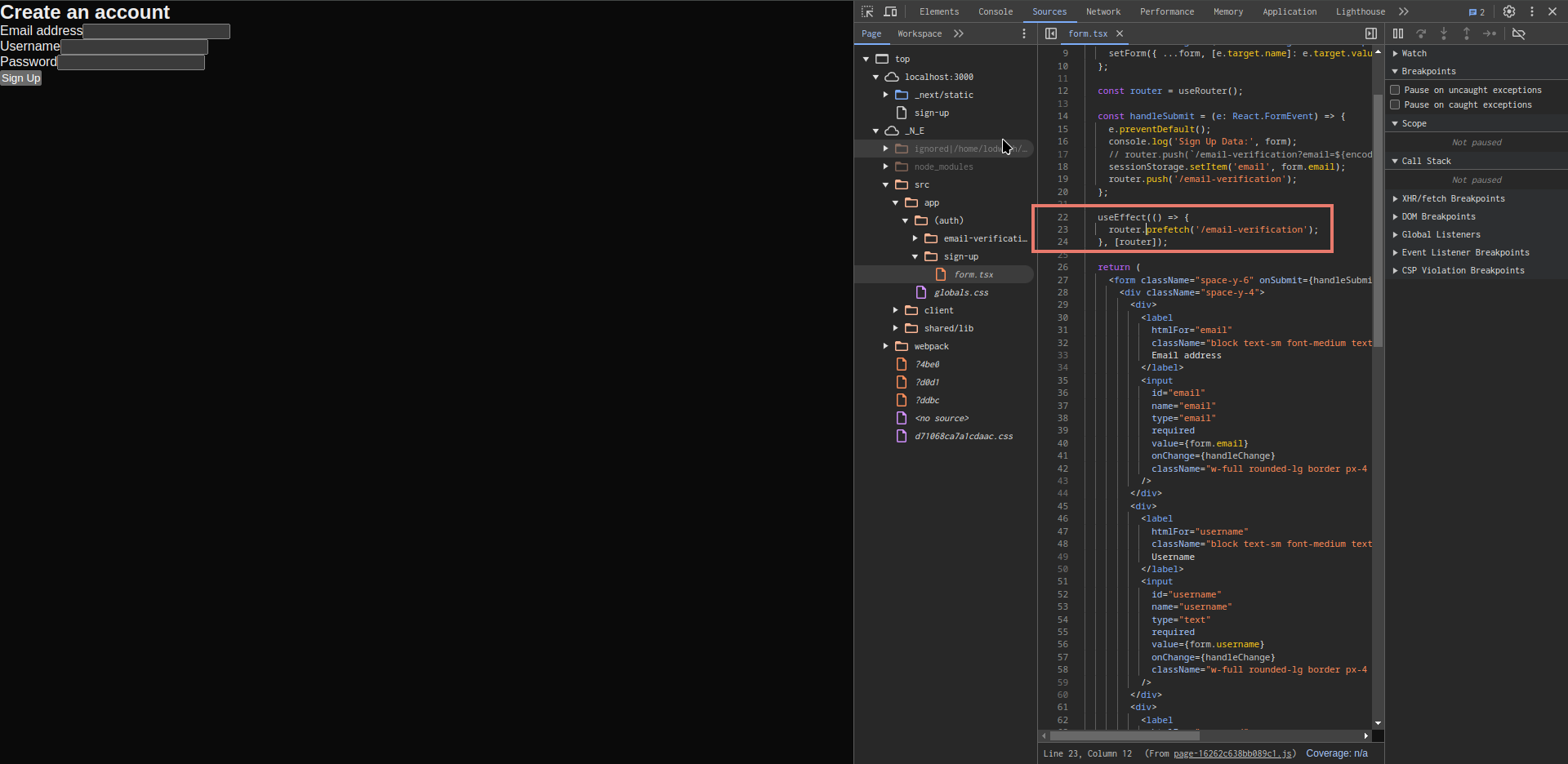
To prefetch the next page programmatically, we can use router.prefetch function.
// sign-up/page.tsx
export const SignUpForm = () => {
  // ommited for brevity

  useEffect(() => {
    router.prefetch(`/email-verification`);
  }, [router]);

  // ommited for brevity
}
Prefetching is only enabled in production build. Before we build the app, let's enable production sourcemap to get a better idea of the effect of prefetching.
const nextConfig: NextConfig = {
  /* config options here */
  // ⚠️ Make sure to disable this option when deploying to live environment!
  productionBrowserSourceMaps: true,
};
Now, let's build the app and open the network tab.
npm run build
npm run start
Open your Network tab and navigate to /sign-up page. You should see some codes of /email-verification page are being loaded.
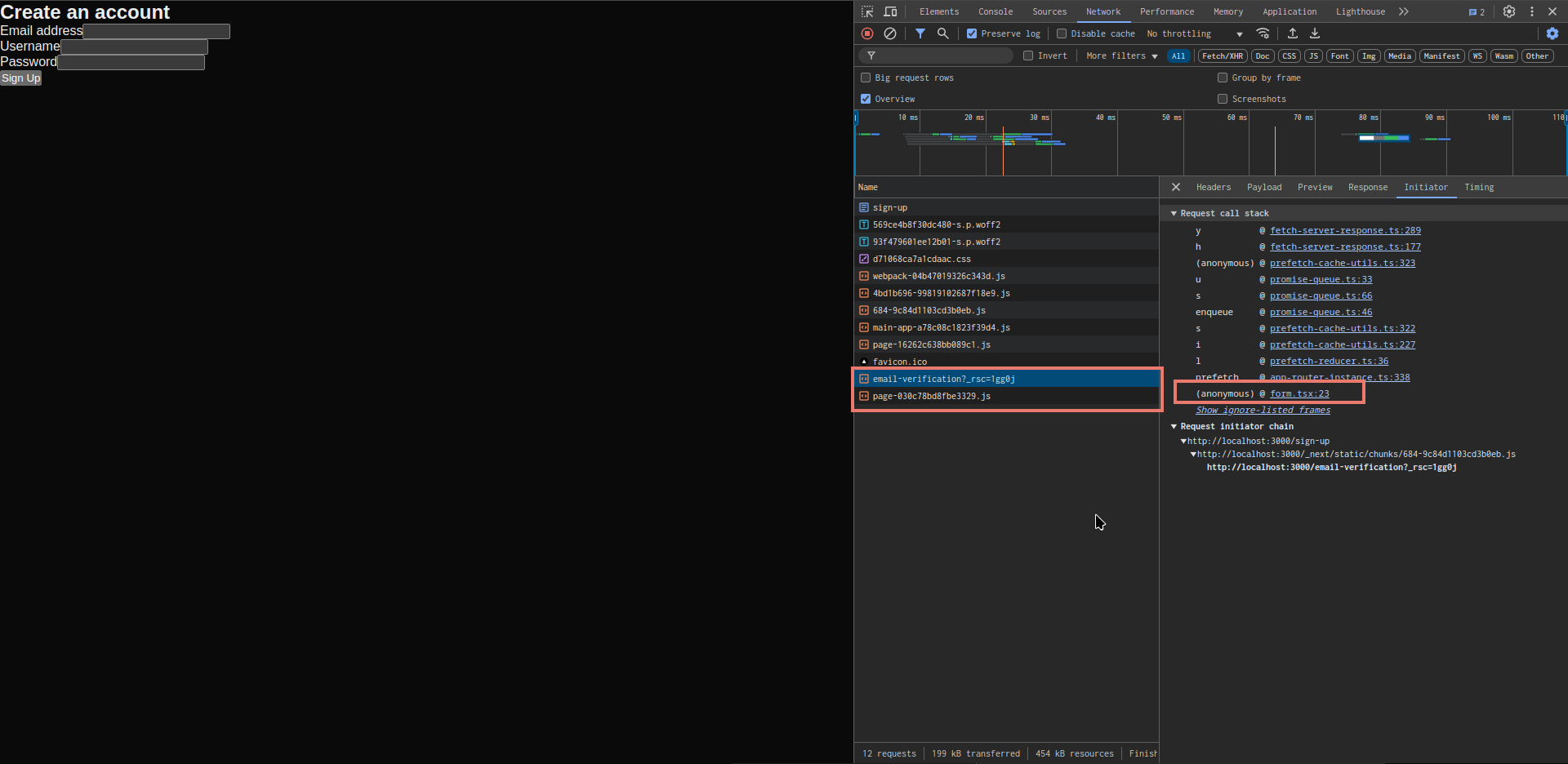
Click on the initiator column of the network tab, and click on the source of the prefetch request. You should see the prefetching code we added earlier.
Conclusion
In this post, we've learned when to avoid using searchParams for passing information or storing state, and what alternatives exist.